
Running agents on GitHub events
A prompt can start when something happens on GitHub, not at a set time. CI fails on your PR, someone asks for your review, an issue gets your label, a PR merges. SimpleEdit notices, and starts a session with your prompt, with Claude, Codex or OpenCode. Or it starts a whole workflow graph. It works like running agents on a schedule, except the prompt waits for the thing it was written for instead of the clock.
SimpleEdit does the watching itself. It asks GitHub through gh from your computer, so there is no server and no webhook to set up.
A triggered run is a normal session. You can open it, read it and type into it. SimpleEdit itself never posts, approves, labels or merges anything on GitHub. The agent pushes a fix or opens a draft PR only when your prompt asks it to, and everything it did waits in its session for you to read.
Before you start
- GitHub CLI (
gh) installed and signed in. Without it the prompt says “Not watching · GitHub signed out”. - Repositories on github.com. Other hosts can’t be watched yet.
- SimpleEdit open and your computer awake. A trigger watches only then.
1. Set up a trigger
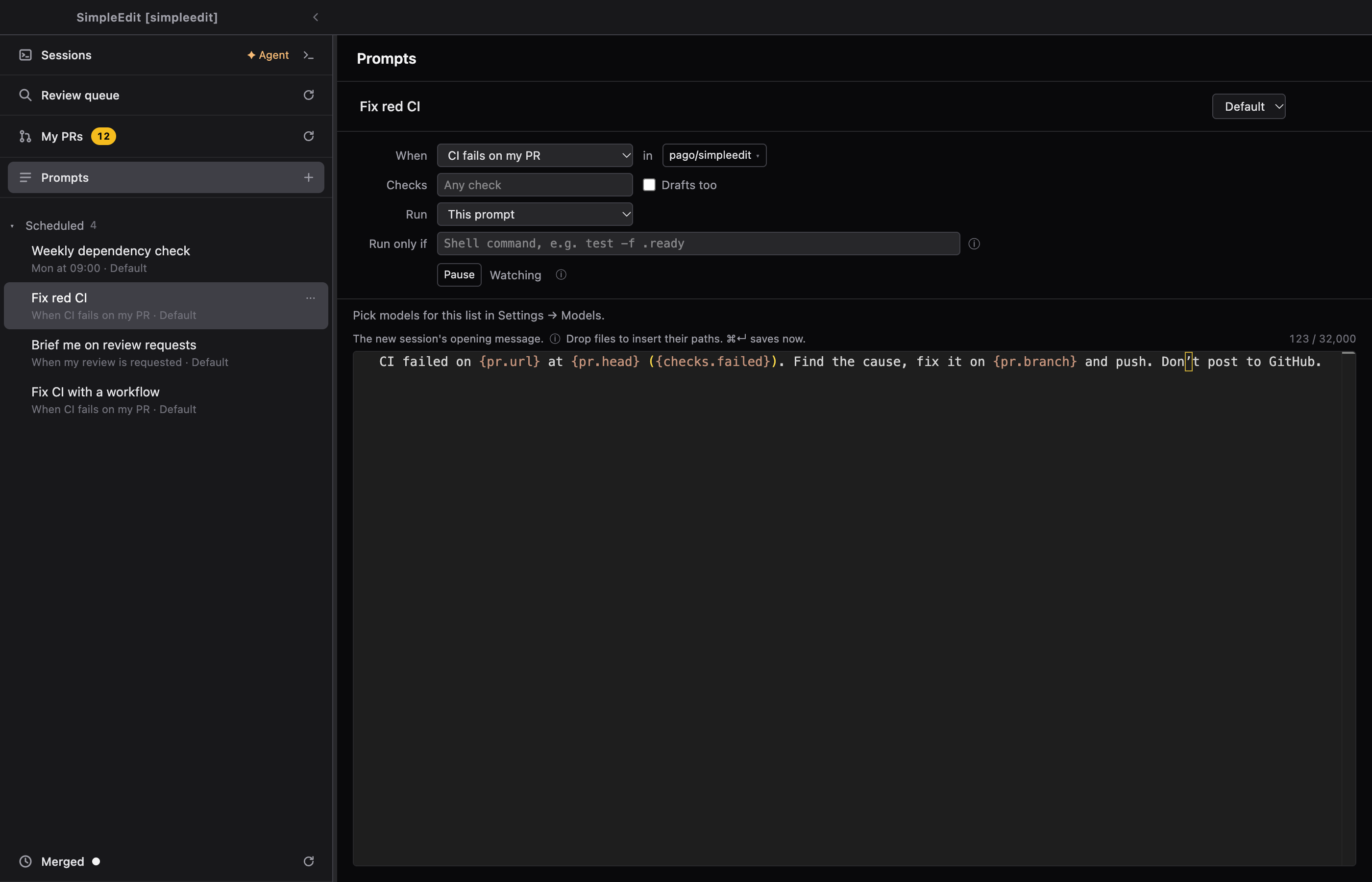
- Open Prompts in the sidebar and select + New. See Saving prompts for later with Prompts.
- Write the prompt. It is sent as the session’s opening message. Use placeholders to point it at the PR or issue that fired.
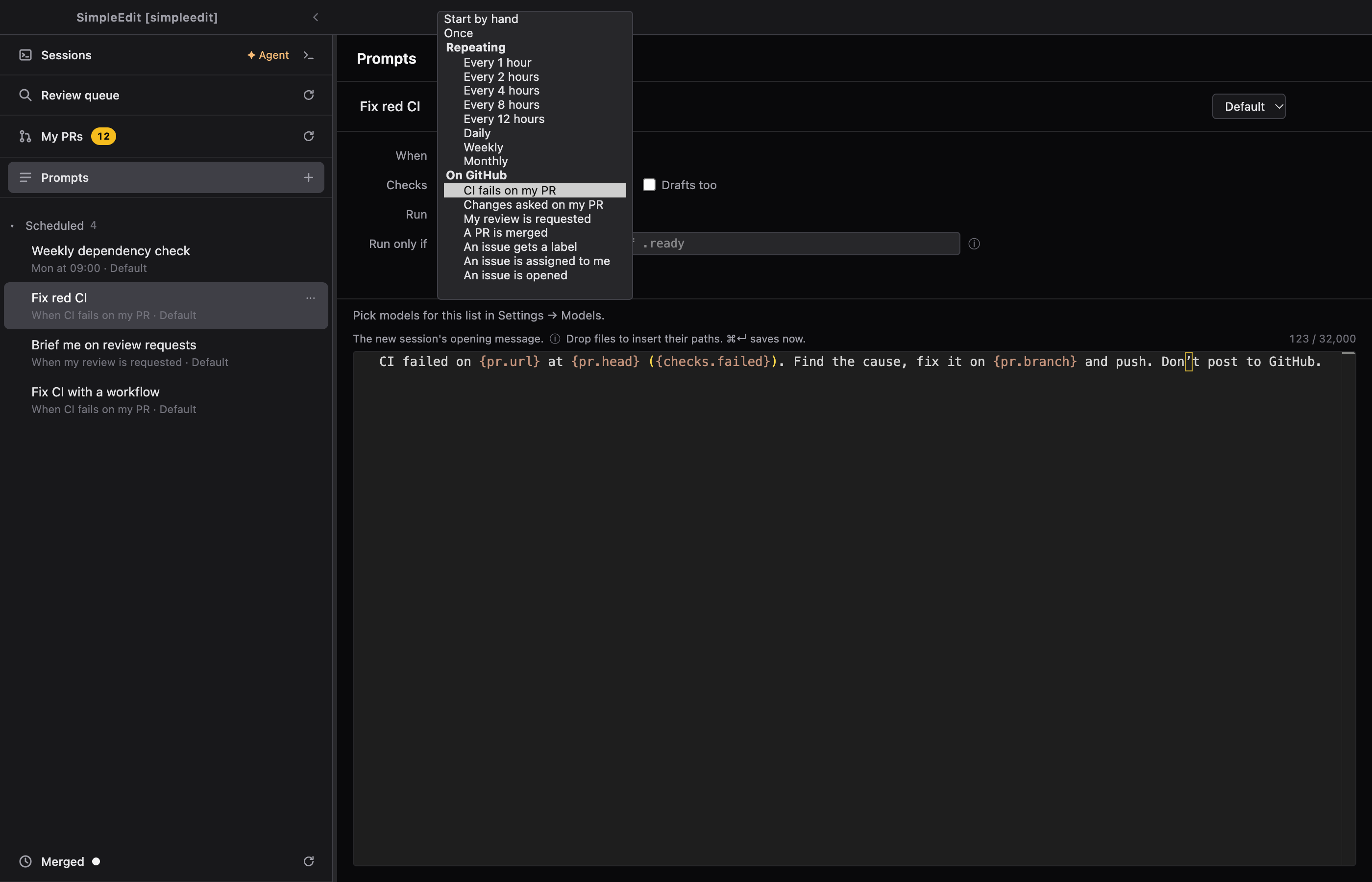
- Open When and pick one of the choices under On GitHub. See the kinds.
- After in, pick the repositories to watch. The default is the project’s repository. You can add others that SimpleEdit knows a local folder for. Locate clone… asks for the folder of one it doesn’t know yet.
- Fill in the filters. Each has its own row.
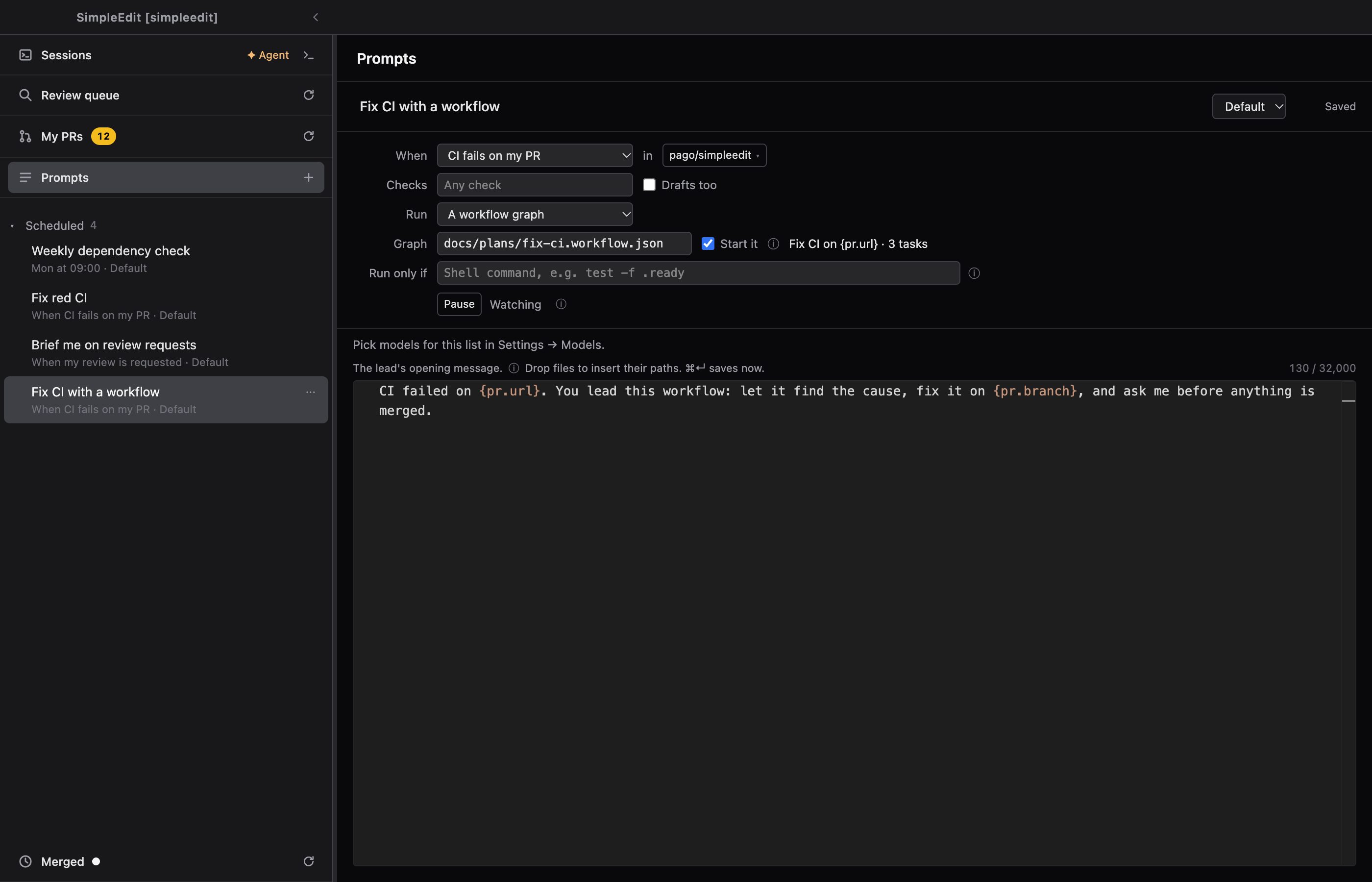
- Optionally pick A workflow graph under Run, see step 5, or add a Run only if command.
A prompt has either a time or an event, not both.
It acts on what matches now
When a trigger is switched on, it runs for everything that matches at that moment, not only for what happens afterwards. If three of your PRs are red when you switch on CI fails on my PR, it starts on all three, within the caps. Check the filters before you switch it on.
Editing a trigger that is already on does not run it again for a commit or an issue it has handled.
2. The kinds
| When | It starts when | Filters |
|---|---|---|
| CI fails on my PR | A check fails on one of your open PRs. It runs once for each commit that fails. | Checks: only these check names, blank for any. Drafts too. |
| Changes asked on my PR | Someone comments on your PR in a way that needs action. Bots and your own comments never count. | Only asks for a change. From: only these people. |
| My review is requested | A PR asks you for a review. | Author: only PRs by these people. |
| A PR is merged | A PR merges into a branch. It watches the project’s repository only. | Into: the branch, main by default. Paths: only PRs that change a matching file, such as src/**. Author. |
| An issue gets a label | An issue gets the label. | Label. |
| An issue is assigned to me | An issue is assigned to you. | Label: only issues with this label. |
| An issue is opened | A new issue is opened. Bots’ issues never count. | Label. Author. Members only, on by default: only the repository’s owner, members and collaborators start a run. |
Filters that take several names accept a list separated by commas.
Where the session starts
- For CI fails on my PR and Changes asked on my PR, SimpleEdit looks for the session that already works on that PR’s branch and hands the prompt to it, as one thread. If no session owns the PR, it starts a new one on the PR’s head worktree. If several sessions own it, the run is skipped and your phone says so, so you pick.
- A workflow worker is never handed to. A new session starts instead.
- For the other kinds, a new session starts in the project.
A new session is named ”↻ ‹prompt name› #‹number›“.
3. Once per commit
A trigger for a PR runs once for each head commit. A red head A runs once. A push that makes head B red runs again. Re-running the checks on A does not. Several review comments on one commit make one run.
Issue and merge triggers run once for each issue or PR.
SimpleEdit checks GitHub every 5 minutes while it is open, so a run starts within a few minutes of the event. After your computer wakes, it checks again after a short wait. Something that was true while it slept and still is runs once. Something that came and went in between is missed.
4. Placeholders
Write {pr.url} in the prompt and SimpleEdit fills in the URL of the PR that fired. They are:
- For PR events:
{pr.url},{pr.number},{pr.branch},{pr.head},{pr.base},{pr.author}and{repo}. - For CI fails on my PR also
{checks.failed}, the names of the failed checks. - For issue events:
{issue.url},{issue.number},{issue.author}and{repo}.
Titles, descriptions and comment text are never filled in. Anyone who can open an issue or comment on a PR could write instructions into them, and the prompt would carry those to an agent that runs without you. The session reads them itself with gh, as an agent would for any issue.
For example:
CI failed on {pr.url} (failed checks: {checks.failed}).
Read the failing logs with gh, find the cause, and fix it on this branch.
Run the project's checks before you push. If the failure is not caused by
this change, say so and change nothing.
Other text in braces passes through unchanged. A prompt that uses a placeholder its event doesn’t provide is refused when you save it.
5. Run a workflow graph
By default a trigger starts one plain session. Under Run, pick A workflow graph to start a whole workflow instead. Any repeating prompt can do this, schedules included.
- Save the graph as a file in the repository, in the folder the project’s window opened. Type its path under Graph, for example
docs/plans/fix-ci.workflow.json. The path stays inside that folder. - SimpleEdit reads the file and shows the graph’s title and task count next to the path.
- Unpause the prompt. This arms the graph exactly as you saw it.
Each run creates the workflow from the file and starts a lead session with your prompt. Placeholders in the graph’s briefs and goal are filled in like those in the prompt.
Start it decides whether the workflow starts by itself. It does only when Settings → Workflows → Leads may start workflows is on. Otherwise the workflow waits as a draft, your phone says “workflow waiting for your Start”, and you start it. See Running a Workflow.
If the file changes after you armed it, the next run is skipped and the prompt pauses, with “Graph changed since you armed it”. Read the graph again, then unpause. This also means an agent can’t swap the graph under an armed trigger.
6. Check on it
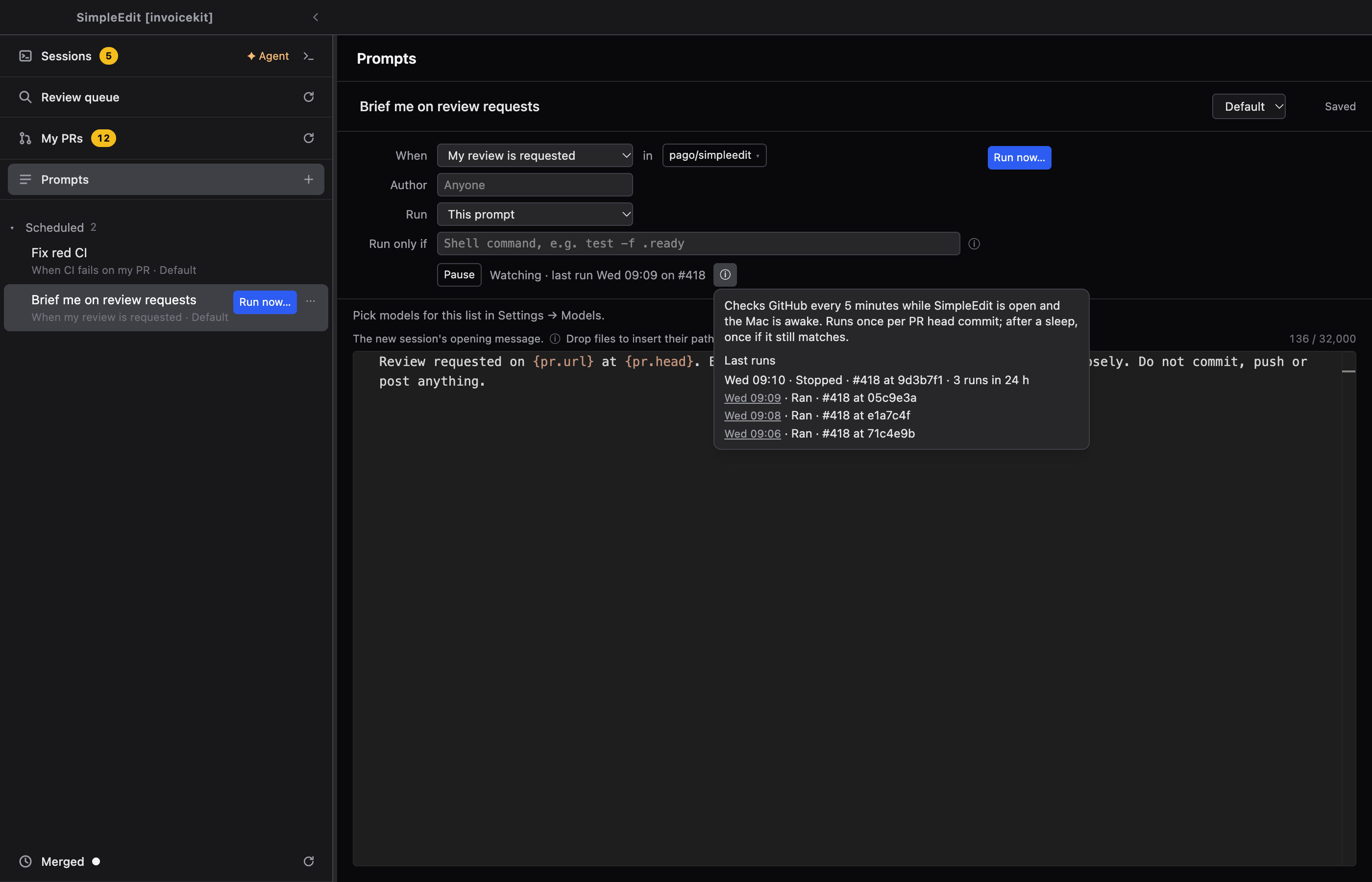
The status line under the trigger says what it is doing:
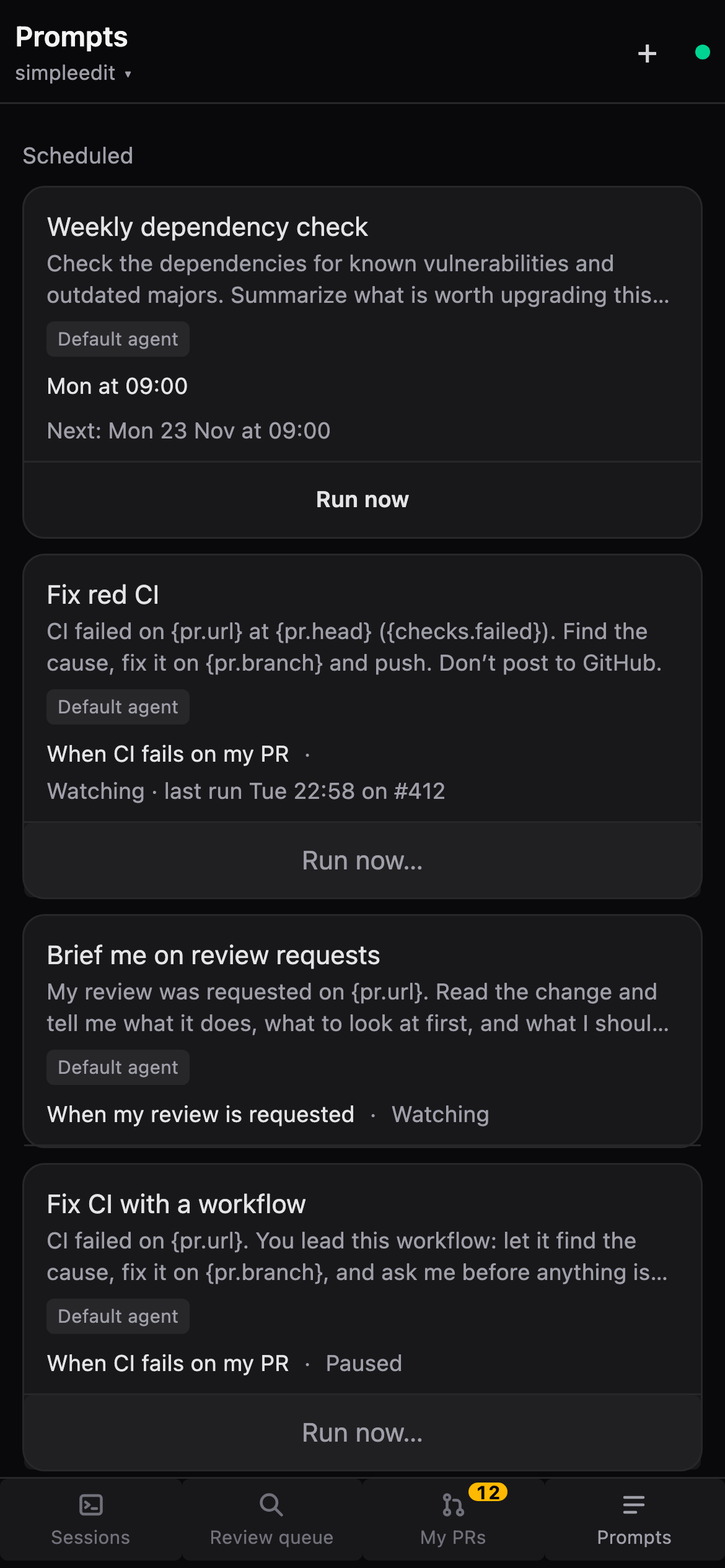
- “Watching · last run Mon 14:05 on #412”. Add ”· 1 waiting” when a match is waiting for a free slot.
- “Not watching · GitHub signed out”. Run
gh auth login, then select Refresh. - ”⚠ Couldn’t check GitHub at 14:05”. It tries again at the next check.
- “Paused for today · 10 runs in 24 h”.
- Paused, added by an agent, or graph changed.
Select the ⓘ next to it. It says how often SimpleEdit checks, and Last runs lists each run with its outcome and a link to its session. A run is listed as skipped with the reason: “Gate: ‹reason›”, “Stopped · 3 runs in 24 h”, “Several sessions own #412”, “Graph changed since you armed it”. A run that was due after a sleep ends in “catch-up after sleep”. A run that could not find a local clone started in the project and says so.
The card stays open when you hover it, so you can click the session links.
Run now…
Run now… lists the PRs or issues that match right now. Pick one and it starts with you there. It does not check Run only if. The trigger will not run for that commit or issue again afterwards.
It counts as one of the day’s runs. When nothing matches, the button is not shown.
7. Caps
A trigger can’t loop. Three limits keep it in check:
- 3 runs at a time for one trigger. A further match waits and the status says “1 waiting”.
- 3 runs for one PR or issue in 24 hours. The fourth is stopped, the history says “Stopped · 3 runs in 24 h”, and you get a push once. This ends a loop of fix, push, red, fix.
- 10 runs for one trigger in 24 hours. Further matches wait, and the status says “Paused for today”.
While a run for the same PR is still going, a new commit waits instead of starting another run. The agent is probably about to push. A run skipped by Run only if and a stopped run start nothing and don’t count.
8. Run only if
A trigger can have a Run only if command, the same one a schedule has. It runs in the project folder before each run, and waits up to 60 seconds. Exit 0 starts the run. Anything else skips it, and the history shows why.
The event reaches the command as environment variables, never in the command text: SIMPLEEDIT_EVENT, SIMPLEEDIT_REPO, SIMPLEEDIT_NUMBER, SIMPLEEDIT_URL, SIMPLEEDIT_HEAD and SIMPLEEDIT_BRANCH. For example, to run only for PRs on a branch prefix:
case "$SIMPLEEDIT_BRANCH" in feat/*) exit 0 ;; *) exit 1 ;; esacA skipped commit or issue counts as handled, and is not tried again.
9. On your phone
The phone shows the trigger: When, its filters, what it runs and the Run only if command, all read-only. You can Pause and Unpause, and use Run now…. You edit triggers on the desktop.
You get a push when a trigger starts a run while you are away, for example “CI watch · started on ui-pack#412”. The usual push follows when the session finishes its first turn without a question for you.
10. When an agent adds a trigger
Ask an agent to “add a prompt that fixes my PR when CI fails”. It adds the prompt, with its trigger and graph, and does not switch it on. The prompt lands Paused, marked “added by an agent”. Read the prompt, the trigger, its filters, the graph and the command, then select Unpause. If anything changed since you opened it, the unpause is refused and you read it again.
An agent can add and edit triggers. It can’t arm one, and there is no way for it to start one.
A run that starts a new session while you are away does not wait for you. With Claude, a call that would ask you for permission is denied, and the agent goes on. Open the session to see what it couldn’t do.
Limits
- Triggers watch github.com only.
- SimpleEdit must be open and your computer awake. A trigger does not run when the app is closed, and it is not something that runs in the cloud.
- It checks every 5 minutes, so it is not instant.
- A PR is merged watches the project’s repository only, and sees merges from the last 24 hours at most.
- The prompt shows only the graph’s title and task count, not the graph. Open the file in your workspace and read it before you arm it.
- If a PR’s local clone is gone, the run starts in the project instead, and the history says so.
Examples
Each one ends with a session, a pushed fix or a draft PR for you to read. The agent touches GitHub only where the prompt tells it to.
Fix my red CI
When: CI fails on my PR. Leave Drafts too off at first.
CI failed on {pr.url} (failed checks: {checks.failed}).
Read the failing logs with gh, find the cause, and fix it on this branch.
Run the project's checks before you push. If the failure is not caused by
this change, say so and change nothing.
The run goes to the session that owns the PR. A fix that is red again runs once more, and after three runs for the PR, it stops and you take over.
Prepare my reviews
When: My review is requested. Use Author to limit it to people you review often.
{pr.author} asked me to review {pr.url} in {repo}.
Read the PR with gh and prepare me for the review: what it changes,
what looks risky, and what to check first. Don't comment on GitHub.
Keep the docs in step
When: A PR is merged, with Paths set to src/**.
{pr.url} was merged and changes code under src/.
Check whether the docs still match, and if not, open a draft PR that
updates them. If they match, say so and open nothing.