
Testing a build on a QA board
Some changes are easier to judge by using them than by reading the diff. A QA board is a checklist your agent writes for the change: what to click, what you should see. You work through it at your desk, mark each card, and send the result back.
The board lives in a QA tab and is saved, so it survives a restart and a long testing session.
1. How a board opens
- An agent asks for one. Any session can open a board: “Open a QA board for this branch.” The tab opens in that session’s workspace.
- A workflow’s QA gate. A QA gate stops the workflow until you have tested the build, before the code-review gate. The board opens in the lead’s workspace, and Open QA board under Needs you takes you to it. See Running a Workflow.
2. Read the board
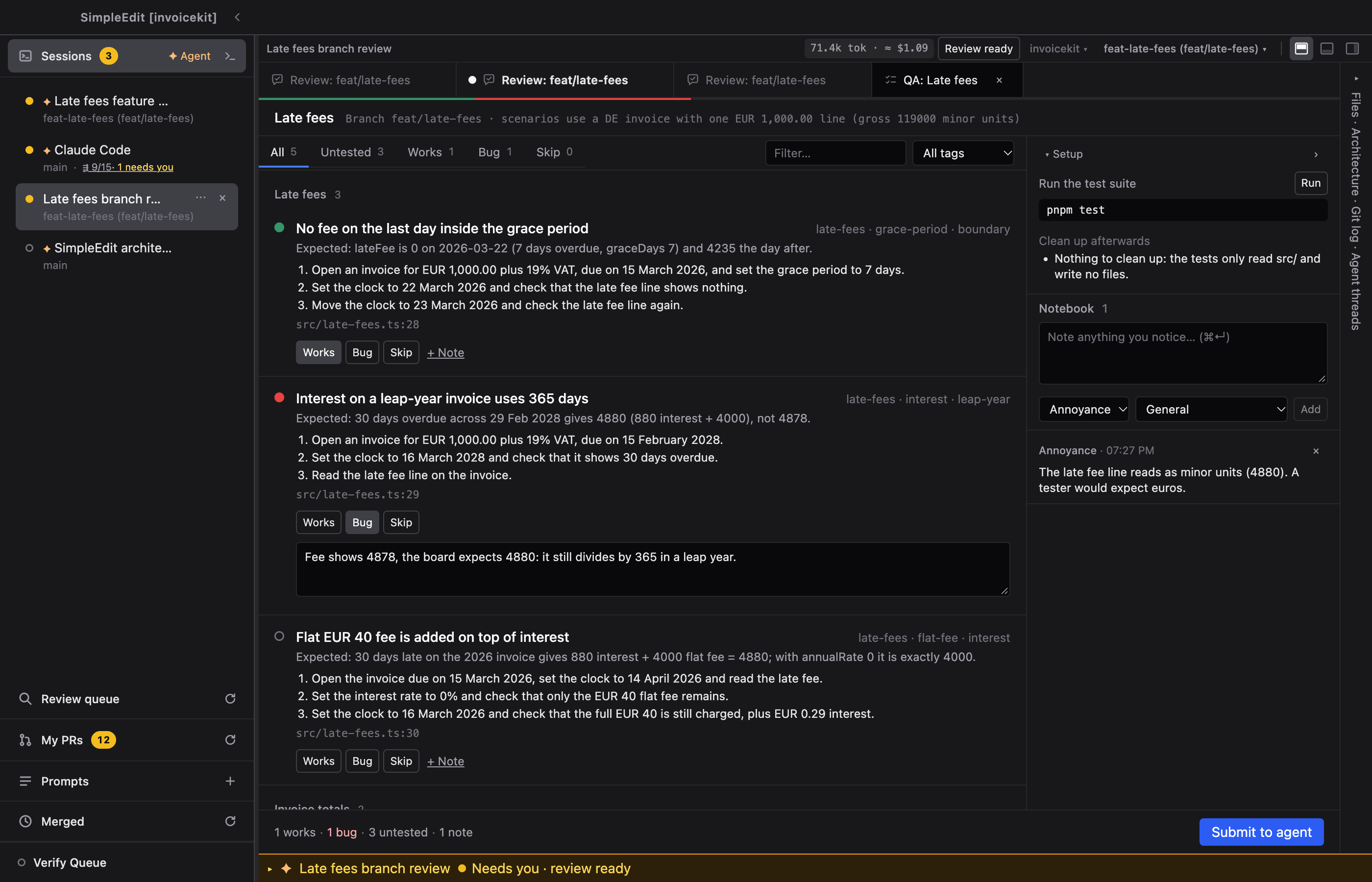
The tab is named QA: ‹title›. It has two panes and one footer.
- The checklist. Cards are grouped in sections. Each card has a title, the steps to follow and a status dot. The tabs above it filter by Untested, Works, Bug and Skip, with counts, and a field filters by text and tag. A collapsible Automated run strip shows what the agent already ran, for example “48 tests passed”.
- The rail on the right. Setup lists what the agent prepared: the build, demo data, a URL, cleanup steps. Notebook is for everything else you notice.
- The footer. The live counts and one decision button.
3. Mark the cards
Each card has Works, Bug and Skip. Choosing Bug opens a note field: write what you saw. To add a note to any other card, select + Note. Notes save when you leave the field.
A card you don’t touch stays Untested.
4. Start the app from Setup
A Setup command shows exactly as the agent wrote it. Select Run to start it. The command runs in a new, ordinary terminal session in the board’s worktree, and you stay on the board. The session shows its logs, takes Ctrl-C, and closes like any other.
The button turns into Terminal while it runs. Select it to jump to that session. After a restart the button is Run again.
5. Use the Notebook
Type a remark and press ⌘↵ to add it. Pick a kind, such as Annoyance, and optionally the card it belongs to. Entries save the moment you add them. They ride along with your verdict as notes, and they never block a pass.
6. Decide
The footer normally shows one decision button. What it says depends on the board.
A board an agent asked for
The button reads Submit to agent. It mails the session that asked for the board with your verdicts and notes, and the agent reads them and acts. If that session is no longer live, SimpleEdit refuses the submit until you resume it. The board stays open meanwhile.
A workflow’s QA gate
- Pass QA is there while no card is a Bug. Cards left Untested don’t block it, and the button says how many are left, for example Pass QA (2 untested).
- With a Bug card, the button turns into a red Request fixes (n). It sends the bugs and your notebook entries to the lead, which patches in fix tasks and reworks the gate.
- With no Bug cards but entries in the Notebook, a secondary Request fixes button also appears beside Pass QA, so feedback that is only annoyances can still be sent back.
When the fixes are done, the same board reopens as Round 2:
- Works and Skip cards fold to one line: “Passed in Round 1 ▸”.
- Bug cards come back as Retest, showing your note from the last round.
- Untested cards stay as they were.
Only you decide. An agent can never pass a board, and it can’t pass a gate for you.
7. For agents
Ask in plain words, and the agent uses these tools:
create_qa_boardopens a board with sections of cards, Setup and an optional automated-run summary.get_qa_boardreads the counts, every verdict and note, and the Notebook.update_qa_boardrefreshes a board in place: new setup, changed or new cards. It never touches your verdicts or notes.
Your submit arrives as mail, and the agent then calls get_qa_board. A workflow’s lead owns its gate’s board. Workers can’t read it or open boards.
How long a board lives
- A board an agent asked for lives until its session closes. A submitted or passed one is cleaned up 30 days after it closed.
- A workflow’s board lives as long as the workflow.
Limits
- Boards open on the desktop only. On the phone, a QA gate shows its counts as waiting for desk QA, and you can Accept it to pass it away from your desk.
- A workflow worker can’t open a board. Only a standalone session or a lead can.
Related
- Running a Workflow: where the QA gate sits in the run.
- Driving SimpleEdit from your agent: ask for a board in plain words.
- Reviewing your agent’s work: the review after the test.